PlayTorrio App Download
PlayTorrio is packed with a variety of content as it offers thosuands of live TV channels, 50,000+ Movies, Series, and drama content, and all of these are provided by 27+ reliable sources on the internet. It comes with Real-Debrid integration that converts supported torrent links into high-speed, direct download or streamable links that accelerate the streaming experience.
100% Safe / Secure / Verified
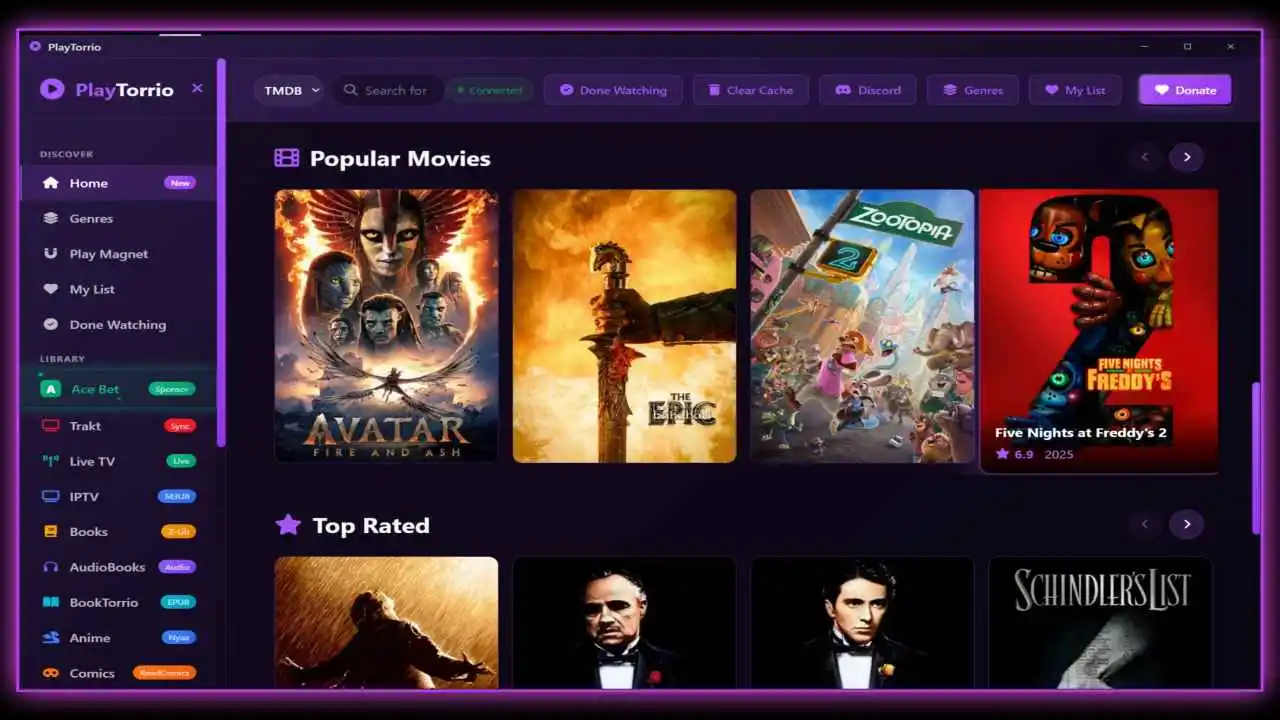
PlayTorrio is an open-source online live TV streaming and entertainment app that serves you 6,000+ TV channels and 27+ HiFi music sources without any paid plan. All you need to do is simply search your country in the app, and you can open the vast library of content such as movies, series, anime, and manga available in this app for your selected region. The app is widely popular for watching TV shows Live Sports, and Movies.
It has support for Real-Debrid, and you can get content access directly from multiple torrent sources. It extracts content metadata information from reliable databases such as TMDB, TVDB, and more to provide users with an accurate description of movies and TV shows. Accumulating content from all around the internet, PlayTorrio offers a stable user interface with a modern look and advanced functionalities for a better viewing experience that makes it one of the most popular and fastest-growing streaming platforms on the internet in the modern era.
Even though it is new, PlayTorrio has already gained trust among millions of users, and right now, around 5 million people are actively using this app on their compatible devices. The Windows and macOS versions of PlayTorrio are extremely popular, but now a separate Android version has been launched that you can download for free from the official site (PlayTorrio.com). All the videos on this Play Torrio, you can watch them in the chosen resolution, it lets you pick the preferred video and audio quality.
It never feels complicated to find any specific channel on this app as it has a neatly organized library and a smooth, quick, responsive interface, making it super easy for users to navigate through all the features, configuration, and settings. On the top bar, you have an option to filter content by country and category. If you like to watch global sports channels, simply choose the category and select the sports genre to explore the list of all sports from around the world.

What is PlayTorrio
PlayTorrio solves the problem of hunting for interesting content to watch for people of all ages. If you’re looking for a TV channel, anime title, live sports, or manga, you may have to search on the internet and visit many websites, but not anymore, as PlayTorrio is an all-in-one media center app developed by Ayman. It brings torrenting, streaming content, and TV channels within an easy-to-use, dark-themed modern UI where you can explore thousands of content at your fingertips, just choose your country or genre to explore a vast array of entertainment content.
Designed with the vision that everyone should have access to a great entertainment tool that is rich with unlimited content to watch without charging any subscription fees. Over the past year, tons of improvements have been made, all the major bugs have been fixed, and now PlayTorrio stands as one of the most popular and widely known free streaming platforms that is safe and reliable to use on Android phones, Windows, Linux, macOS, and Smart TV devices.
With the recent update, a ‘Favorite List‘ feature has been introduced to this app to allow users to add a TV channel, manga, music, or torrent source to the favorite list so that you can easily locate it the next time. With the short introduction about this app, you get to know a lot of things about this app, but trust me, this is just the Tip of the Iceberg; there are a whole lot more features it has that you can check out in this blog. We’ll break down how to install the app, what devices it works on, and the key settings you should know. Hang tight and scroll down to begin the ride.
Features of PlayTorrio
There is never-ending content and a boatload of features that turn your boring time into fun. Listed below are some of the key highlights to explore.
Elegant Interface
Its unique design and dark theme layout feel quite fresh. It has various types of content, so there is a sidebar menu where all the content, features, and options for settings are placed for you to easily choose the desired genre and type of content you want to watch.
Picture-in-Picture
With PIP mode, you can run the video in the background while using other apps on the same device. The video will play in a floating player that the user can drag to any corner of the screen and enjoy watching a movie or TV show while doing other tasks simultaneously.
Media Downloader
PlayTorrio comes with a built-in Media downloader tool, enabling users to download on-demand content such as movies, series, anime, music, and manga in the desired audio language. You can’t download live TV programs, but you can record them to watch later.
Record Videos
When you watch a live TV or movie, you can see a red-coloured record icon at the bottom left corner, and tapping on that will start recording the media player and the content, and when you tap on it again, it will stop. You can go to the Record section from the sidebar menu and download the recorded video.
Play Magnet
You can play any game from Play Magnet while being offline. It features SnakeTorrio, Clumsy Bird, 2048, Candy Crush, City Builder, etc. In SnakeTorrio, munch on orbs to grow your snake and outlast opponents. Build your dream city in CityBuilder, and swap candies in Candy Crush to clear the board.
Watch Live News & Sports
With 6,000+ Live TV channels, you can find programs from all over the world in regional and foreign languages. It mainly features live news and sports-related channels that stream real-time broadcasting of TV shows without advertisements.
Personalized Home Feed
The home feed is highly customizable, as users can change the grid view style, switch from the new to the old interface. The suggestions are based on the individual’s taste, which gets better as you use it for more than a week.
Done Watching
The moment you watch the final episode of a series or complete a movie from start to finish, it will be saved in the ‘Done’ section. It helps Play Torrio improve future recommendations and keeps your viewing progress organized.
Anime Content
Going inside the Anime tab unlocks your gateway to access 1500+ anime titles across all genres. It features all the popular series with the latest episodes and seasons that you can watch for free in the chosen video quality.
Extra Features
- Listen to Music Ad-Free: A ‘Music’ tab can be found in the sidebar menu as the app provides millions of songs and music extracted from various reliable sources on the internet, and you can listen to unlimited songs without ad disturbance.
- Zero Buffering: It plays videos in compressed format that does not compromise the video quality, but reduces the data consumption by 37% minimizing buffering and enabling streaming of videos buffer-free even with slow internet.
- Easy Cache Management: Over time, the cache files pile up, causing various problems like blank screen, frequent buffering, and glitches, so there is a clear cache button inside the app so that you can easily clear app cache regularly, such as once a week or month, to avoid such problems.
- Customer Support: Found a bug? Now you have a feature to report them to the app development team and request any specific feature through the Discord community.
- External Media Player: The web portal and mobile app provide a basic media player, but PC users have the feature to pair media with external players such as VLC or MPV players to enhance the streaming experience and get better controls over your videos.

How to Download and Install PlayTorrio on Android?
The official Android version of PlayTorrio can be downloaded from the official site – PlayTorrio.com. For a trouble-free downloading experience, follow our detailed installation tutorial.
Step 1: Click on the above Download button and choose the device type, such as Android, to start downloading the most compatible version of the PlayTorrio app.
Step 2: Open the Settings menu of your phone, then scroll down a bit and click on the ‘Security & Privacy’ section. If the Unknown Sources option is disabled, click on the toggle icon to enable this setting.
Step 3: If the app is fully downloaded, go to the Download folder in your default File Manager app and find the PlayTorrio APK file.
Step 4: You can install the app by tapping on the APK file, an install button will pop up so click on it to initate the installation process.
Step 5: Go back to the home screen and click on the PlayTorrio icon to launch the app. Remember, unlike the PC version, the Android version of this app does not have an auto update benefit, so users have to download it from the website.
System Requirements & Dependencies
It is an extremely lightweight app and does not consume much processing power, but here are the basic components you need to have working on your device to be able to use it seamlessly without lag.
Windows
- Windows 10/11 or above
- NSIS Installer
- Full feature support
- 2GB Free Space
- 2.0 GHz dual core
macOS
- macOS 10.15 or higher
- Intel & Apple M1 to M5
- Native .app support for players
- 2GB Free Storage Space
- 2GB RAM
Linux
- AppImage & .deb packages
- Ubuntu, Debian, Fedora, Arch
- 2.0 GHz Dual Core Processor
- 2GB Available Storage
- Internet connection is required
Dependency: Windows and macOS users must have VLC Media Player installed on their devices to be able to stream content from this app.
How to Install PlayTorrio on Windows?
It is natively available for all PC devices, and setting up is not a hassle at all. Just check out the given installation guide, download the app, and open it to have it ready to use on your system.
For Windows:
- Follow this link and click on the Download for Windows button to get the PlayTorrio Installer EXE file.
- Once downloaded, double-tap on the Installer.EXE file to open it.
- Select Run, then Next, and finally click on the Install button to initiate the installation.
- Once installed, you can launch the PlayTorrio app by tapping on its icon from the desktop home screen.
For macOS:
- Open Safari and search for ‘https://playtorrio.com/‘, click on the Download button, then select macOS to download this app.
- Go to the Finder and locate the
PlayTorrio.dmgfile, then double-tap on it. - Drag the PlayTorrio to the Applications to install it.
- Once done, you can find the PlayTorrio in the application section, so open it and enjoy!
For Linux:
- Hit the above Download button and select the Download for Linux option to download the latest
PlayTorrio.AppImagefile. - Double-tap on the downloaded file to open it.
- Go to the Settings and click on Switch to Advanced Mode (Main App) to access its full version.
Configuration and Quick Setup Process
- If it shows ‘Windows Protected on Your PC’ while trying to install it on your device, then simply go to the Settings.
- Locate Privacy & Security > Windows Security > App & Browser Control.
- Click on the option labeled ‘Reputation-based protection setting’ and disable the Check apps and files option.
- Now, go back and try to install the app again, and it will install smoothly without any issues.
- After successful installation, launch the PlayTorrio app and go to the Settings
- Scroll down a bit and tap on the Switch to Advanced Mode option to dive into the main app interface and unlock its full potential.
FAQs
Conclusion
PlayTorrio is the powerhouse of all free movie and OTT content streaming platforms. People can download the app on their phone, PC, and Smart TV devices to enjoy watching the latest films, series, anime, reading e-books, and listening to unlimited music ad-free. The PlayTorrio app is indeed unique as it is the ultimate platform where the audience can access everything for free for cost.
Beyond movies, PlayTorrio boasts an epic library for music lovers. Stream your favorite tracks on speakers or groove with headphones—your choice! Bookworms can chill with tons of e-books, from novels to comics and mangas. There are fun mini-games to keep boredom at bay and help you unwind. Finally, I hope you’ve installed this app successfully on your compatible device and if you need any help, feed free to reach out to our experts.